Device manager
The device manager menu is used to configure a user-specific measurement device setup. The user can load and save several device configurations depending on the used hardware.
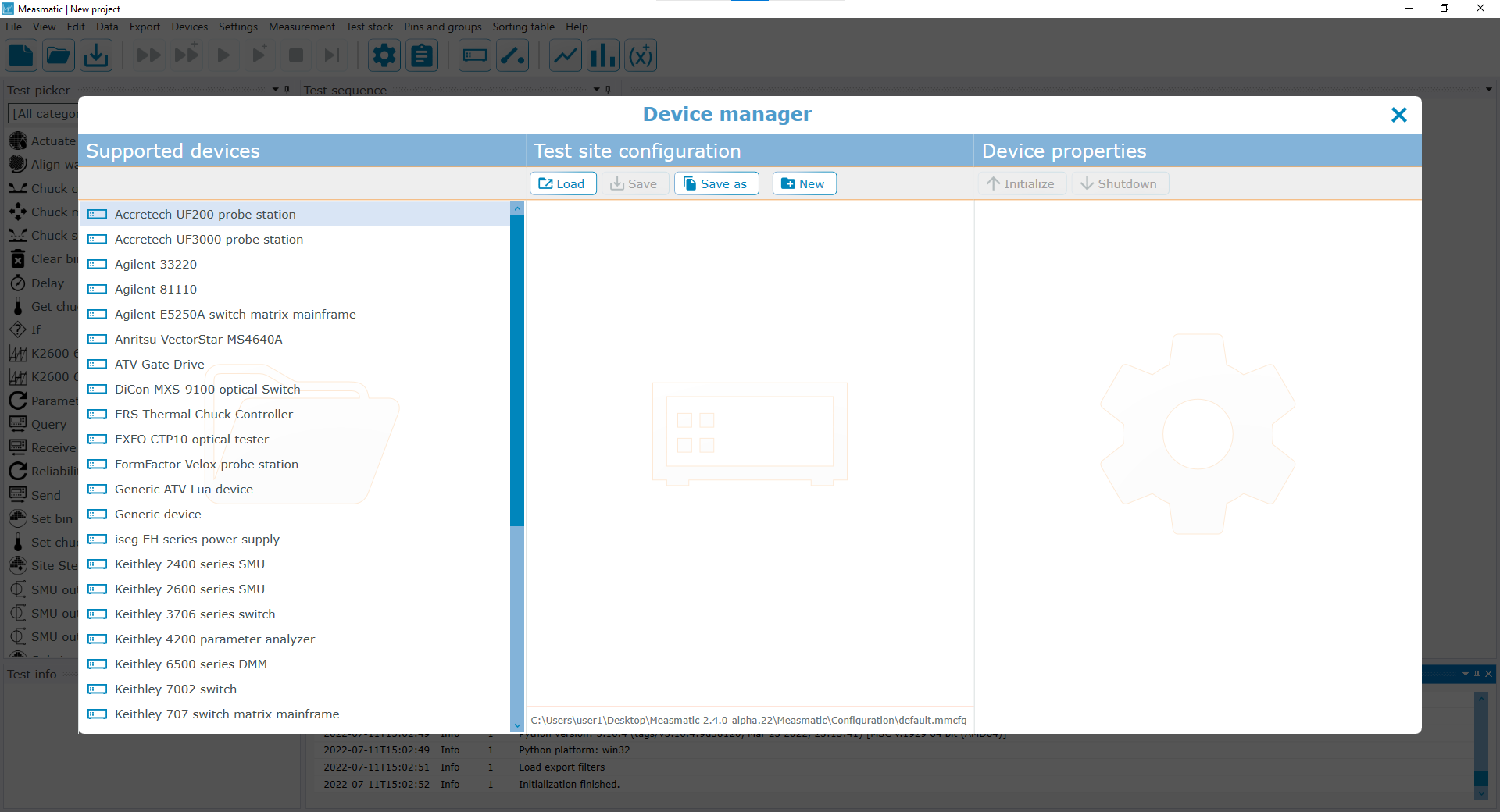
Device manager
Measmatic communicates with devices via TCP/IP, GPIB or RS232. Devices without a dedicated driver can be addressed as a generic device. To add a device to the test configuration, it can be simply placed via drag and drop inside the test site configuration and configured individually.
Test site configuration#
The test site configuration allows the user to load, save or create device configurations to allow an easier and faster setup for different tests. The configuration file will be saved as Measmatic config file (*.mmcfg). Devices can be placed via drag and drop from the list of supported devices. Selecting a device in the test site configuration with a left button click updates the device properties that can be changed individually. With a right button click on a device, the option is displayed to remove the selected device. Devices can also be deleted with the keyboard "DEL" button.
| Button | Description |
|---|---|
| Load | Open a device configuration file |
| Save | Save the current configuration |
| Save as | Save the current tests site configuration into a user-defined config file |
| New | Create a new test site configuration |
Device properties#
The connection of each device can be initialized or closed individually by using the functions "Initialize" and "Shutdown" on top of the device properties menu. For an initialized device connected via TCP/IP, "Open console" opens a console for communicating with the device directly. Depending on the selected device, the properties menu displays the necessary settings to communicate with the hardware.
| Group | Caption | Description |
|---|---|---|
| General | Name | Specific identifier for the device |
| Communication settings | Connection | Connection Type (RS-232, TCP/IP or GPIB) |
| Timeout[s] | Waiting time for the device until the Measmatic application displays a timeout | |
| IP address | [Only applicable when TCP/IP is selected] IP-Address of the connected device | |
| Port | [Only applicable when TCP/IP is selected] Used port number of the device connection | |
| GPIB address | [Only applicable when GPIB is selected] GPIB-Address of the connected device | |
| COM port | [Only applicable when RS-232 is selected] Used COM-Port for communicating with the device | |
| Baud rate | [Only applicable when RS-232 is selected] Baud rate for communicating with the device | |
| Stop bits | [Only applicable when RS-232 is selected] Amount of stop bits (None, 1, 1.5 or 2) | |
| Parity | [Only applicable when RS-232 is selected] Parity setup (None, Odd, Even, Mark or Space) | |
| Data bits per byte | [Only applicable when RS-232 is selected] Amount of databits per byte (5, 6, 7 or 8) | |
| Handshake | [Only applicable when RS-232 is selected] Communication handshake setup (None, XON/XOFF, RTS or RTS with XON/XOFF) | |
| Logging of device communication | If enabled, the device writes additional information about its communication to the log | |
| Automatically reconnect after connection error | If enabled, Measmatic tries to reconnect to the device automatically after a connection error | |
| TSP Settings | Node number | [Only applicable when a Keithley device is selected] Specifies the Node number that is set on the device |
| Default TSP master device | [Only applicable when a Keithley device is selected] If activated, the current device is the Master that can be used to distribute the measurement tasks via TSP-link to the connected Slaves. Only a single master device can be configured, other master devices will be switched to slave-mode if activated | |
| Channel configuration | Configuration | [Only applicable when a Keithley device is selected] Defines if a single or dual source is connected |
| SMU A | [Only applicable when a Keithley device is selected] Identifier that can be used to address the (Sub)-SMU | |
| SMU B | [Only applicable when a Keithley device is selected] Identifier that can be used to address the (Sub)-SMU | |
| Channel 1-3 | [Only applicable when a Rigol or Agilent device is selected] Identifier that can be used to address the (Sub)-Channels | |
| GPIB board configuration | Manufacturer | [Only applicable when GPIB is selected] Specifies the GPIB-Card in the PC (Adlink or NI) |
| Name | [Only applicable when GPIB is selected] GPIB-Board Name | |
| GPIB address | [Only applicable when GPIB is selected] GPIB address of the PC PCI-Card |
Table: Device properties